Workflow Designer
Activate provides a full-featured, web-based workflow designer that enables both technical and non-technical users to configure, extend, and adapt workflows to match their organisation’s business processes.
The designer is intentionally built as a low-code environment, allowing business users, service desk teams, and IT administrators to collaborate on workflow design while maintaining appropriate governance and control.
Activate ships with out-of-the-box workflows that address common identity and access management scenarios. These workflows can be used as-is or modified to reflect organisation-specific approval paths, notifications, conditions, and escalation logic—without requiring custom code.
Workflow Tab
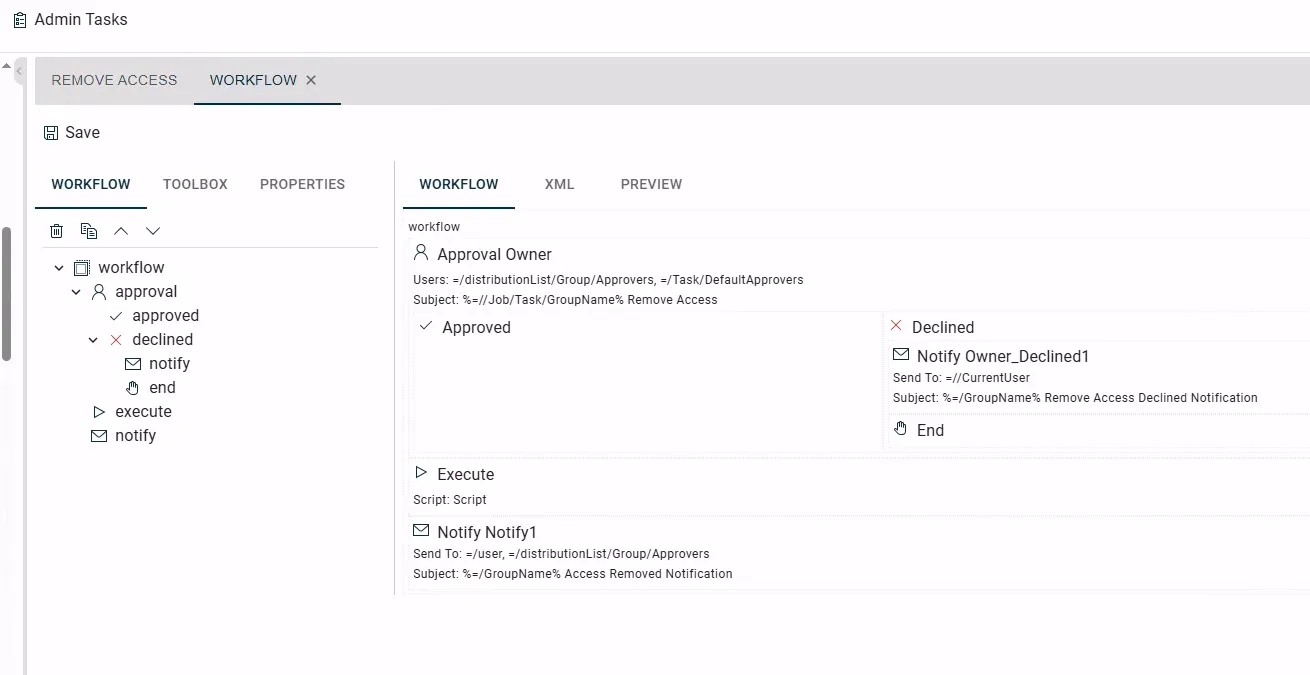
The workflow designer is organised into clearly defined functional areas to support usability, clarity, and collaboration.
Workflow Canvas
A workflow is constructed visually from reusable components such as:
- Approval steps
- Notification actions
- Conditional logic and flow control
- Branching and decision points
Components are assembled using a drag-and-drop model, making the overall process flow easy to understand for both technical and non-technical stakeholders. This visual representation supports shared ownership and review between business and IT teams.
Toolbox Tab
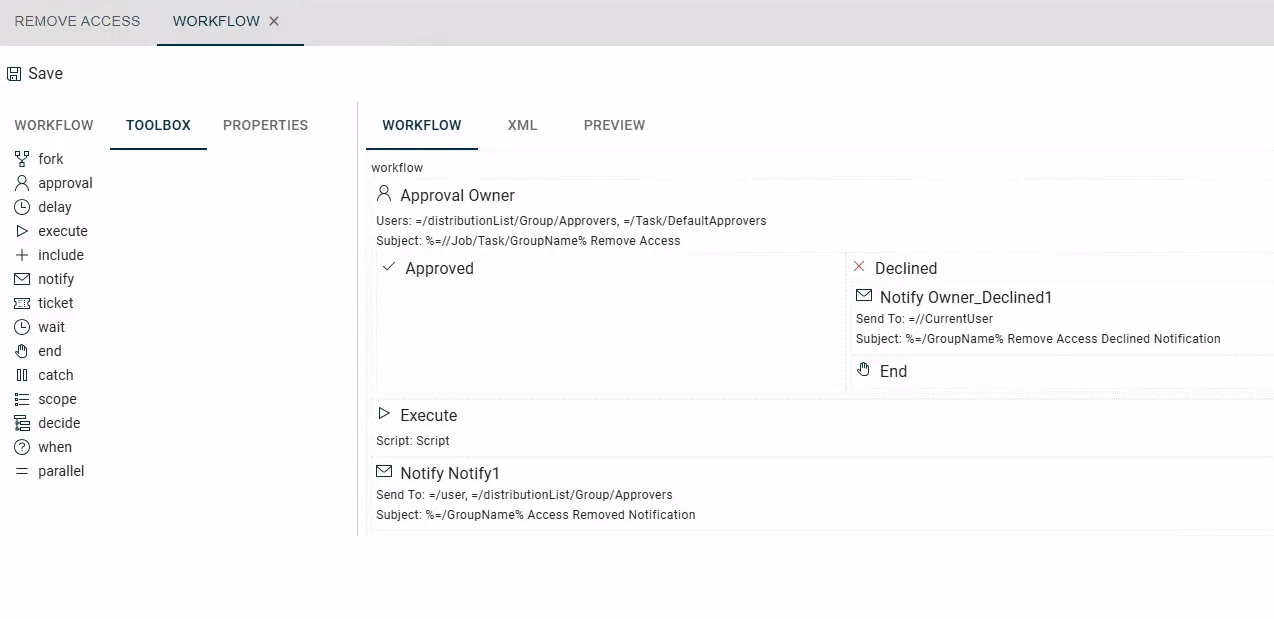
The toolbox provides a curated list of pre-built workflow components that can be added to a workflow.
These components encapsulate common IAM actions and patterns, allowing users to:
- Build workflows without writing code
- Reuse consistent, IT-approved building blocks
- Extend or adjust workflows incrementally as business requirements change
This approach enables citizen development within defined guardrails, ensuring flexibility without compromising platform integrity.
Properties Tab
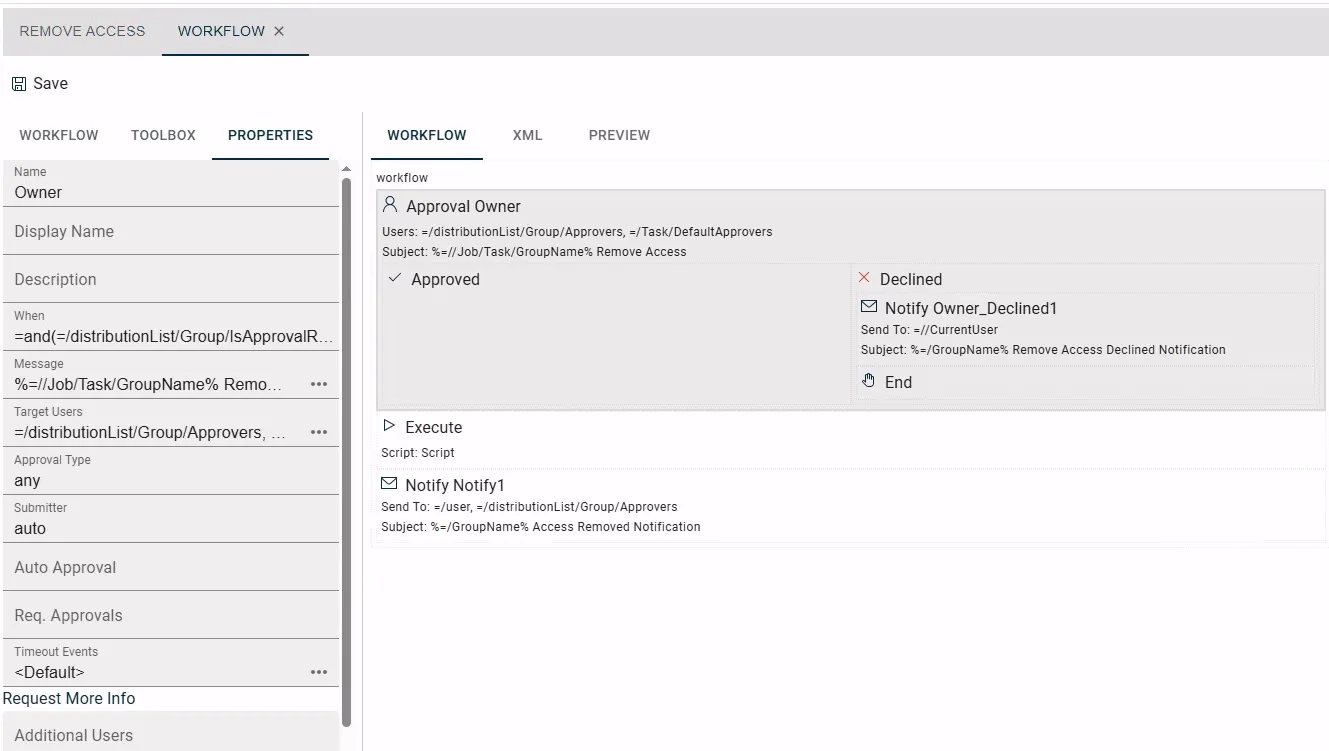
The properties panel allows users to configure the behaviour of individual workflow components, including:
- Conditional logic and decision criteria
- Message content for notifications and approvals
- Target users, groups, or email recipients
- Timing, escalation, and control settings
Configuration is performed through structured fields rather than scripts, enabling business users to make changes confidently while allowing IT to retain oversight of supported capabilities.
Supporting Business–IT Collaboration
Activate’s workflow designer is designed to support collaborative development, where:
- Business teams define and refine process logic and approval requirements
- IT teams provide governance, validation, and platform oversight
- Changes can be implemented and tested quickly without full development cycles
By combining low-code configuration with IT-approved components, Activate enables organisations to respond to changing business needs while maintaining control, consistency, and auditability.
Activate Expression Language
In addition to visual workflow configuration, Activate includes an accessible, low-code expression language that allows end users to implement conditional logic and dynamic content within workflows.
The expression language is designed to be human-readable and approachable for non-developers, while still being powerful enough to support common business rules and decision logic. Expressions are used consistently across workflows, approvals, and notifications, making behaviour predictable and easy to understand.
Conditional Logic and Decision Making
The expression language allows users to define conditions that control workflow behaviour, including branching logic based on user attributes, request details, or system state. It can be used to trigger or skip approvals, control notification delivery, and influence escalation paths based on evaluated criteria.
This enables business rules to be expressed directly within workflow configuration, without requiring custom scripts or external development effort.
Dynamic Content in Messages
Expressions can be embedded within notification and approval message content to generate context-aware communications.
This allows messages to insert dynamic values such as user details, request-specific information, or dates, and to adjust wording based on evaluated conditions. As a result, communications remain consistent and informative while still being relevant to the specific workflow instance.
Supporting Low-Code Extension with Guardrails
The expression language provides a controlled extension point between fully visual configuration and traditional custom development. It enables more advanced scenarios to be addressed while remaining within the platform’s supported and governed capabilities.
This approach supports low-code development by business and service teams, encourages collaboration between business and IT, and provides flexibility without introducing unmanaged or unsupported custom code.